WordPress Marketing Automation: The Ultimate Guide


Imagine the Freedom of Marketing Automation
Picture this: you’re running a bakery. You’re bustling around, making bread, frosting cakes, and greeting customers. Now, wouldn’t it be amazing if someone could handle your marketing while you worked your baking magic? That’s what a marketing automation platform integrated with your WordPress site and plugins can do for your website! It takes care of repetitive tasks, so you can focus on the heart of your business.
202%
Higher conversion rates on landing pages with personalized calls-to-action than generic pages.
61%
of consumers are willing to share their data to personalize their shopping experience, leading to more sales & loyalty.
91%
of consumers are more likely to shop with brands that offer relevant recommendations and personalized offers.
What Exactly is WordPress Marketing Automation?
Think of it as hiring a friendly helper who never sleeps. With workflow automation, your WordPress site can send emails, initiate popups, gather leads, follow up with customers, and keep them engaged—all without you lifting a finger. And the best part? Your “helper” doesn’t even require coffee breaks.
WordPress marketing automation is all about using WordPress plugins, tools, and integrations to streamline your marketing. It’s like a self-driving car; you set the destination, and it handles the journey.
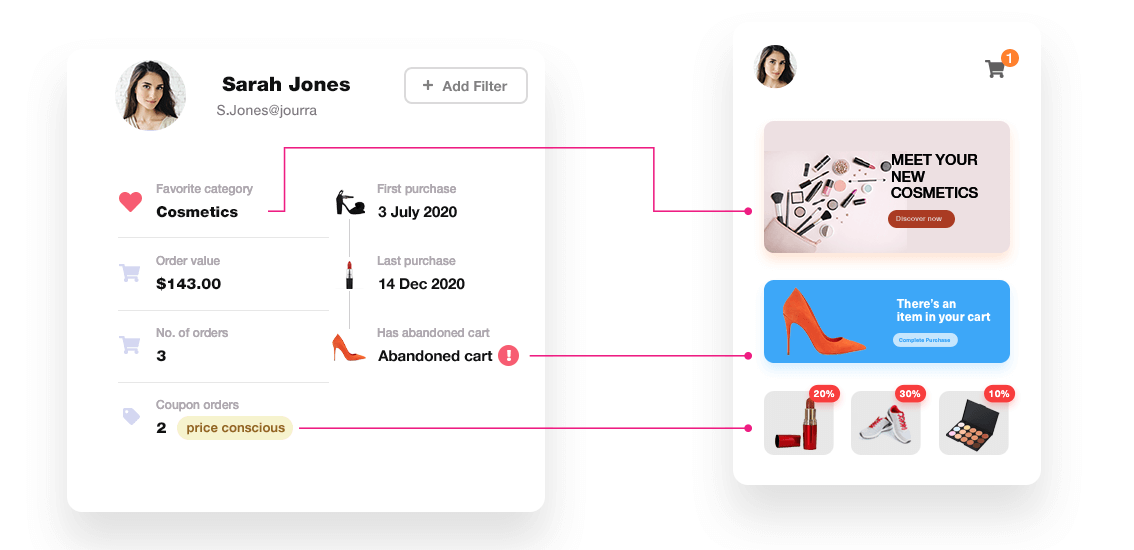
Key Automation Tasks for Your WordPress Site:
- Lead Capture and Nurturing: Convert visitors into leads with customizable forms and popups, segmenting each according to their needs or preferences.
- Email Marketing Automation: Schedule campaigns, send reminders, and welcome emails—all targeted and timed perfectly.
- Customer Segmentation: Group customers based on website or shopping behavior and demographics, ensuring they receive the content they’ll love most.
- Content Updates and Social Media Integration: Automate content updates or posts on social media channels to stay active without lifting a finger.
Why You’ll Love It (and So Will Your Customers)
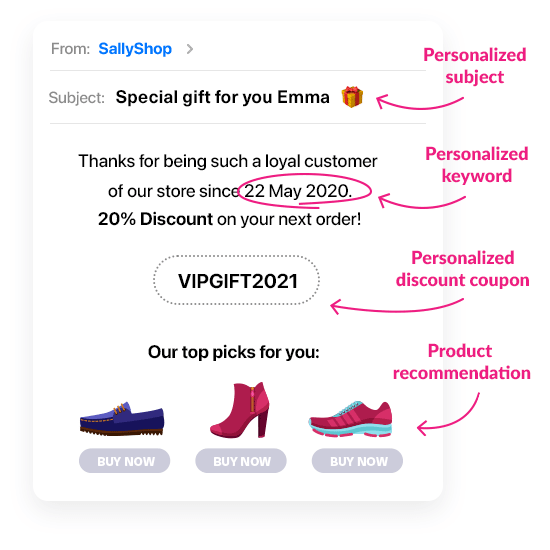
With automation, you can personalize messages without typing each one out. Imagine sending a warm “Welcome!” email to every new customer just as they click “Sign Up” on your site. You’re there for them, but you’re also free to work on the parts of your business you love most.
Running a business is hard enough without needing to remember every marketing task. Automation lightens the load, so you can focus on things like growing your brand, brainstorming new ideas, or actually taking a lunch break.
Added Benefits:
- Customer Retention: Regular, personalized follow-ups build trust and keep your brand top of mind.
- Increased Efficiency: By setting up workflows for repetitive tasks, you save time and energy.
- Insightful Data Collection: Automation gathers user data, allowing you to improve based on real insights.
Unlock Seamless WordPress Automation with ConvesioConvert’s Multi-Channel Marketing Automation Solution! Personalize Your Customer’s Experience on Every Platform.
Transform your WordPress site into a powerhouse of efficiency and engagement with ConvesioConvert’s robust email marketing solutions. Imagine automation that doesn’t just handle routine tasks but enhances every interaction—fast-loading pages, personalized webpages, and targeted email campaigns—all powered by Convesio’s industry-leading infrastructure. Whether you’re scaling up or personalizing your customer experience, Convesio’s seamless integrations make it effortless to keep your site running smoothly while you focus on what truly matters: growing your business. Start a free trial today!
Essential Tools for WordPress Email Marketing Automation
To transform your WordPress site into a true marketing powerhouse, consider a range of plugins that cover essential tasks. These plugins allow you to create and schedule email campaigns, capture leads, and keep track of your audience’s interactions seamlessly. Tools specifically designed for WordPress users cater to their unique needs, such as importing existing users and creating contact lists based on various triggers related to WordPress activities.
Think of these tools as your digital marketing team, working behind the scenes. For example, lead capture plugins help turn casual visitors into loyal customers, while email automation plugins handle timely outreach, delivering messages just when your audience is most likely to engage.
Choosing the Right Marketing Automation Plugin for WordPress
Choosing the right marketing automation plugin for your WordPress website can feel like picking the perfect tool from a vast toolbox. With so many options available, it’s essential to consider your specific needs and goals. Here are some factors to keep in mind:
- Ease of Use: Imagine you’re setting up a new kitchen gadget. You want something intuitive, not a device that requires a 100-page manual. Look for a plugin with an easy-to-navigate interface, even if you’re not a tech wizard.
- Features: Think about the types of automated campaigns you want to create. Do you need advanced features like conditional logic or A/B testing? Make sure the plugin offers what you need to achieve your marketing goals.
- Integration: Your plugin should play well with others. Ensure it integrates seamlessly with other WordPress plugins and services you use, like WooCommerce or your favorite email marketing tools.
- Scalability: As your business grows, your plugin should grow with you. Choose one that offers flexible pricing plans and can handle an increasing number of contacts and automated campaigns.
- Support: When you hit a snag, you want reliable customer support. Look for a plugin with comprehensive documentation, tutorials, and a responsive support team.
By considering these factors, you can select a marketing automation plugin that fits your unique needs and helps you achieve your marketing goals.
Key Features to Look For:
When selecting a marketing automation plugin for your WordPress website, there are several key features to look for. These features will help you create effective automated campaigns, streamline your marketing workflows, and improve your overall marketing strategy. Some of the key features to look for include:
Creating Contacts Lists and Segments
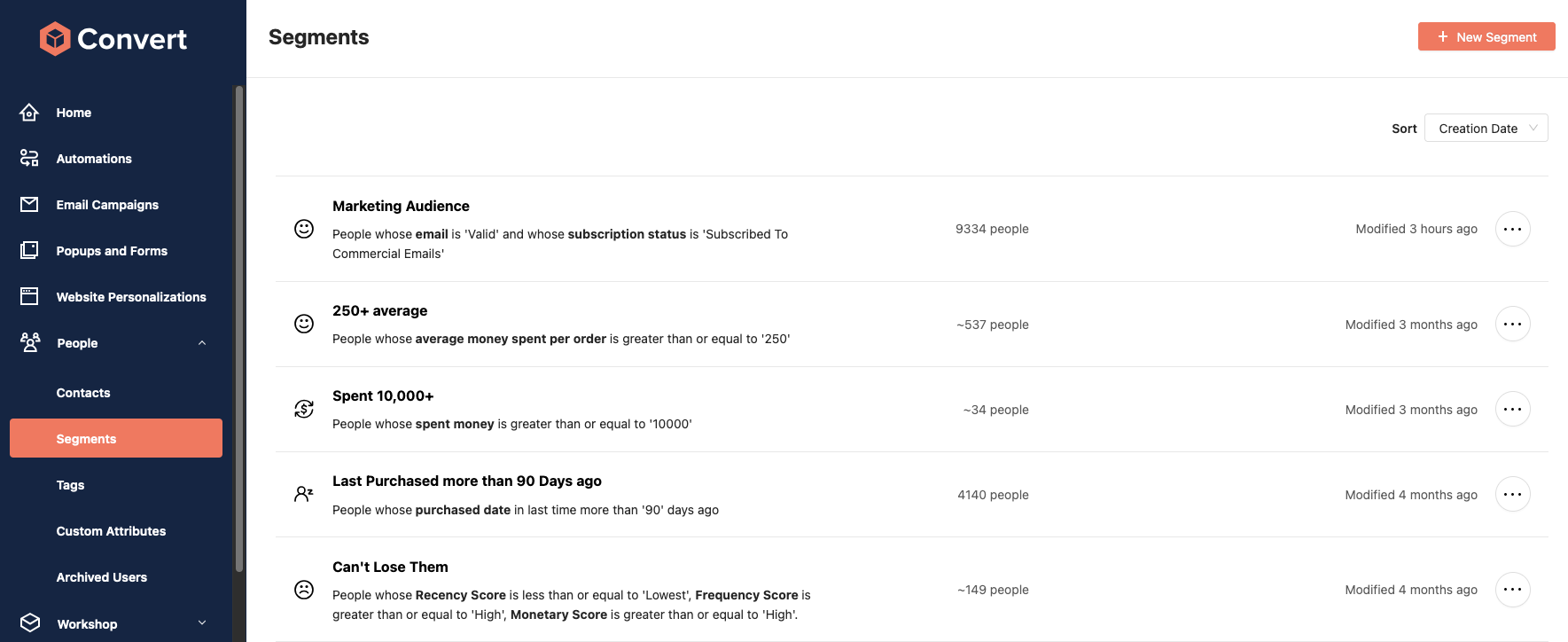
Creating contacts lists and segments is an essential part of marketing automation. A good marketing automation plugin should allow you to create contacts lists based on user behavior, such as email opens, clicks, and purchases. You should also be able to segment your contacts based on demographics, such as age, location, and job title.
Integrating with Other WordPress Plugins and Apps
Integrating your marketing automation plugin with other WordPress plugins and apps is essential for creating a seamless marketing workflow. Some of the plugins and apps you may want to integrate with include:
Making Automation Human: The Personal Touch
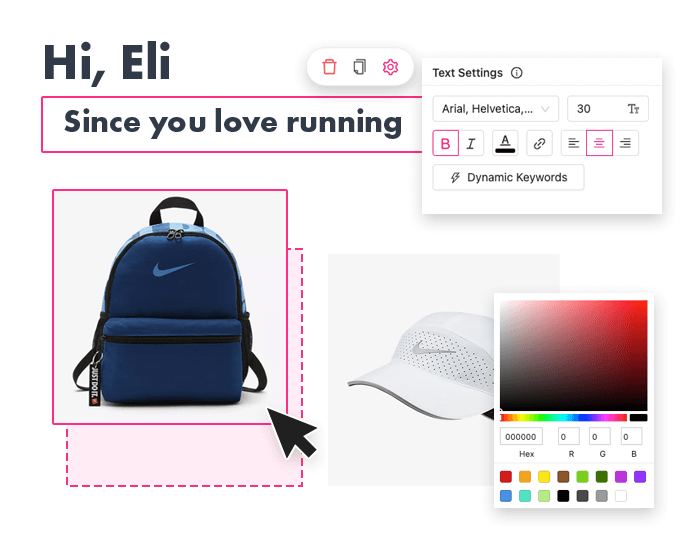
Ever received a “Dear Valued Customer” email and felt like it was written by a robot? With the right WordPress automation, you can avoid that vibe entirely. By segmenting your audience, you can send each visitor content that actually feels relevant. Have customers who love cat products? Send them content about the latest in kitty luxury, not dog grooming tips.
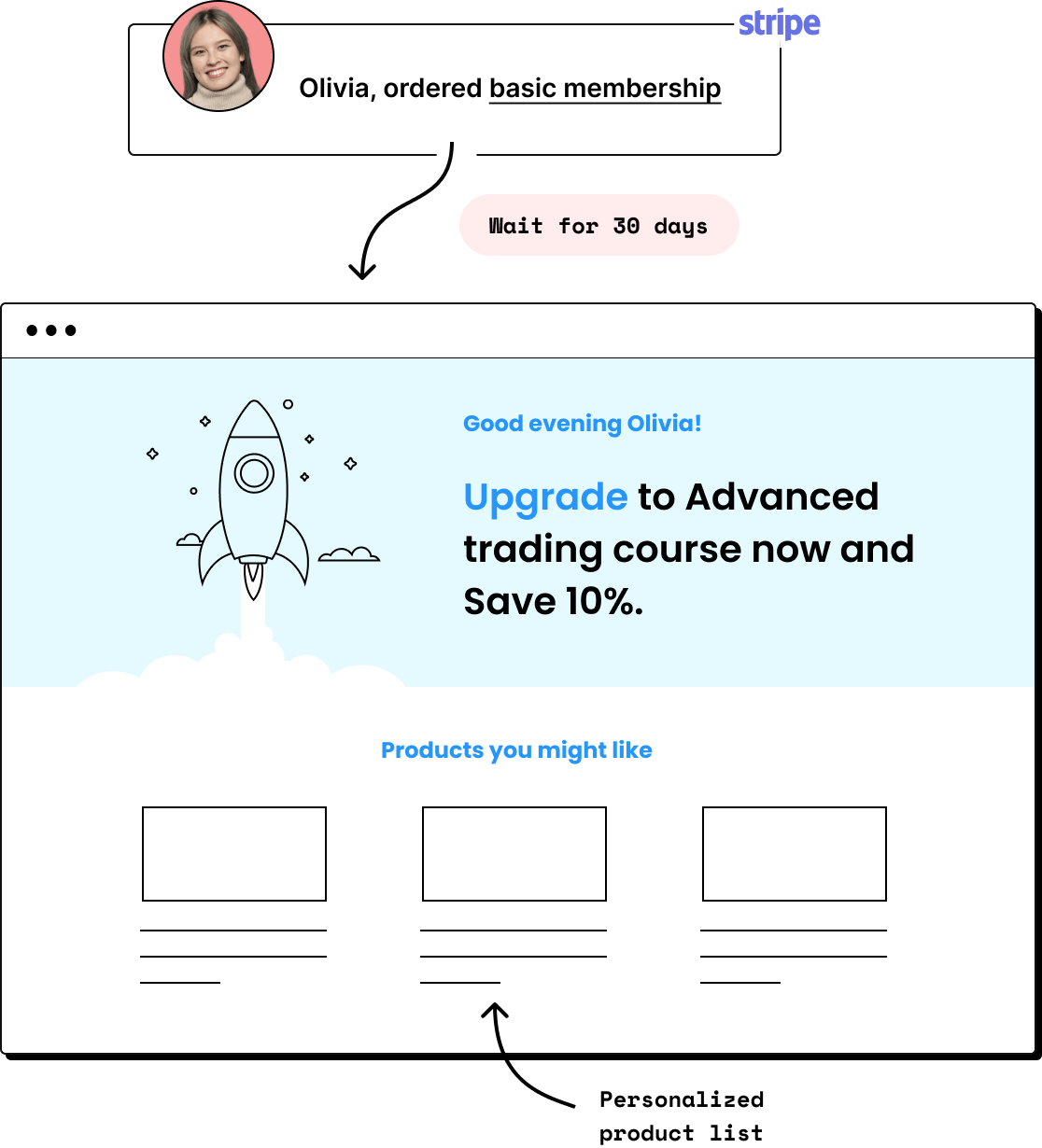
Using WordPress forms, you can capture leads and personalize your communication based on the information collected.
Pro Tips for Adding a Personal Touch:
- Segment by Interests: Divide your audience into meaningful groups (e.g., product preferences or buying frequency).
- Customize Content and Timing: Send different content to first-time visitors versus regular customers.
- Celebrate Milestones: Send automated birthday or anniversary greetings that make customers feel special.
The “Set It and Forget It” Myth
Here’s a funny thing about automation: it’s easy to assume that once you set it up, you’re done. But just like a new plant, it needs occasional care. Check in, make sure your emails don’t sound outdated, and that your offers are still relevant. A “Spring Sale” email in the dead of winter? Oops! So, while automation saves you time, a little maintenance keeps it from feeling stale.
How to Start Automating and Create Automated Campaigns (Without Overwhelming Yourself)
Feeling a bit like you’ve signed up for a marathon? Start with simple WordPress plugin to automate one task and build from there. Set up one automation, see how it works, and build from there. Begin with an easy task, like a “Thank You” email for new sign-ups. Once you see how that boosts engagement, you’ll feel ready to try automating other tasks.
Email Marketing Automation
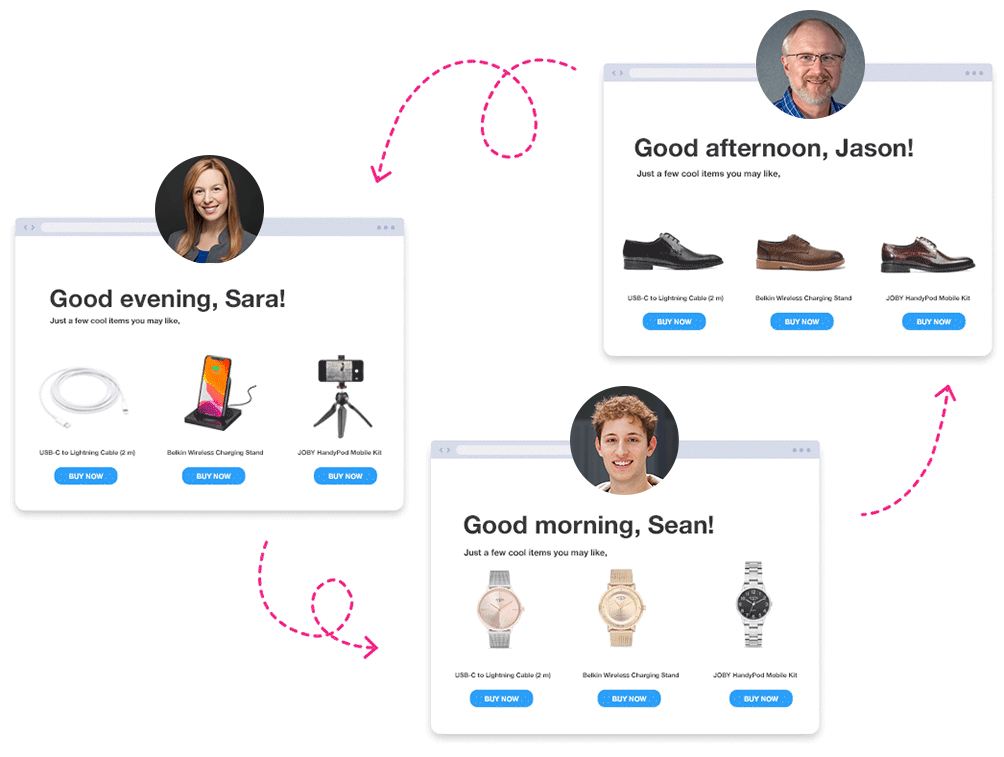
Picture this: a new customer signs up on your WordPress site, and within minutes, they receive a personalized welcome email. That’s the magic of email marketing automation. Here’s how it can transform your business:
Benefits:
- Personalization: Automate emails that feel personal. Send messages based on user behavior, preferences, and demographics, making each email feel like it was crafted just for them.
- Efficiency: Save time by automating repetitive tasks. Whether it’s sending welcome emails or reminding customers about abandoned carts, automation handles it all.
- Increased Conversions: Use automated email campaigns to nurture leads and encourage conversions. A timely follow-up can turn a curious visitor into a loyal customer.
Choosing an Email Marketing Plugin:
- Email Builder: Look for a user-friendly email builder that lets you create visually appealing emails without needing a design degree.
- Automation Triggers: Ensure the plugin offers a range of automation triggers, like user behavior, purchase history, and demographics, to tailor your messages.
- Conditional Logic: Choose a plugin that offers conditional logic, allowing you to create complex automation workflows that respond to specific user actions.
Creating and Sending Automated Emails
Creating and sending automated emails is a key feature of marketing automation. A good marketing automation plugin should allow you to create automated email campaigns based on user behavior, such as email opens, clicks, and purchases.
Lead Generation and Nurturing
Lead generation and nurturing is an essential part of marketing automation. A good marketing automation plugin should allow you to create lead magnets, such as eBooks and webinars, and nurture your leads through automated email campaigns.
Analytics and Reporting: Fine-Tuning Your Efforts
Think of analytics and reporting as the GPS for your marketing automation journey. They guide you, showing what’s working and where you might need to take a detour. Here are some essential features to look for:
- Campaign Performance: Track the performance of individual automated campaigns. Metrics like open rates, click-through rates, and conversion rates tell you how well your messages are resonating.
- Contact Behavior: Monitor how your contacts interact with your emails. Are they opening them? Clicking on links? Converting? This data helps you understand your audience better.
Conclusion
With WordPress marketing automation, your website can truly become a dynamic tool for customer engagement, lead nurturing, and growth. Imagine what you could achieve by freeing up time from repetitive tasks—more brainstorming, better content, and, most importantly, more time for the parts of your business you enjoy. So, go on and make your WordPress site work for you. Let automation handle the heavy lifting while you focus on making your brand shine!
FAQs
Does WordPress marketing automation require technical skills to set up?
Not necessarily. Many popular automation tools come with user-friendly interfaces and pre-built templates that make it easy to get started, even for beginners. And, if you’re new to automation, there are plenty of tutorials and guides to help you along the way.
Will automation replace my need for a marketing team?
Automation enhances what your marketing team does but doesn’t fully replace them. Automation handles repetitive tasks, like sending out reminders or responding to common queries, freeing up your team to focus on creative strategy, customer experience, and campaign innovation.
What are the risks of using too much automation?
Over-automation can feel impersonal if not monitored closely. If customers receive too many automated messages, they may disengage or feel like they’re just a “number.” A good rule of thumb is to regularly review your automated workflows to ensure they stay fresh, relevant, and customer-focused.
Can I use WordPress marketing automation for social media as well?
Absolutely! Many automation tools for WordPress integrate with social platforms, allowing you to schedule posts, share content automatically, and even monitor engagement. This can be a great way to keep a consistent presence across platforms without manually posting each day.
How do I know if my automation is working effectively?
Analytics tools can show you how automation impacts engagement, conversions, and other key metrics. By tracking open rates, click-throughs, and sales, you can see what’s working and where adjustments might be needed. Checking these metrics regularly helps keep your automation efforts on track and effective.
Is it expensive to get started with WordPress marketing automation?
There are options for every budget. Many automation tools offer free plans with essential features, so you can start small and scale up as your needs grow. You don’t need a big budget to enjoy the benefits of automation—you just need to choose the right tools for your goals.