This article explains how settlement times and payouts work in ConvesioPay, why payouts may not immediately match daily sales, and where you can view detailed payout information in your account.
Quick Summary
- ConvesioPay follows a standard settlement timing process where transactions are processed immediately, but funds typically settle a few business days after the purchase date.
- Payment processing fees are deducted at the time of the transaction. Any funds that settle into your ConvesioPay balance and become eligible for a bank payout will already have processing fees deducted.
- Payouts are processed after settlements complete, typically the same day as settlement.
- Funds may appear in your bank account later that same business day or the next day, depending on your bank.
- Differences between sales and payouts are usually due to pending settlements or reserves.
How Settlement Timing Works
When a customer completes a transaction, it is processed immediately, but it does not settle into your ConvesioPay balance right away.
In most cases, transactions settle about two business days after the purchase date, though this timing can vary slightly and is not guaranteed to be exact every time.
Because of this delay, very recent sales may not yet be included in your latest payout.
How Payouts Work
Once transactions settle:
- Transactions usually settle at 6:00 a.m. CET.
- Payouts to your connected bank are typically scheduled around 7:00 a.m. CET.
- Funds usually appear in your bank account later that same business day, depending on your bank’s processing timelines.
Important:
Settlement usually occurs about two business days after a transaction, but the timing isn’t always exact. The specific transactions included in a payout can only be confirmed once that payout has completed.
Why Your Payout May Not Match Your Recent Sales
If your payout looks lower than expected, it is usually due to one or more of the following:
1. Pending Settlements
Recent sales may still be within the two‑business‑day settlement window and have not yet settled.
2. Reserves
Some merchant accounts have a reserve, which means a portion of each transaction is temporarily held back before payout.
- Reserve amounts are deducted before payout
- This can cause payouts to be lower than total sales
Where to View Your Payout Details
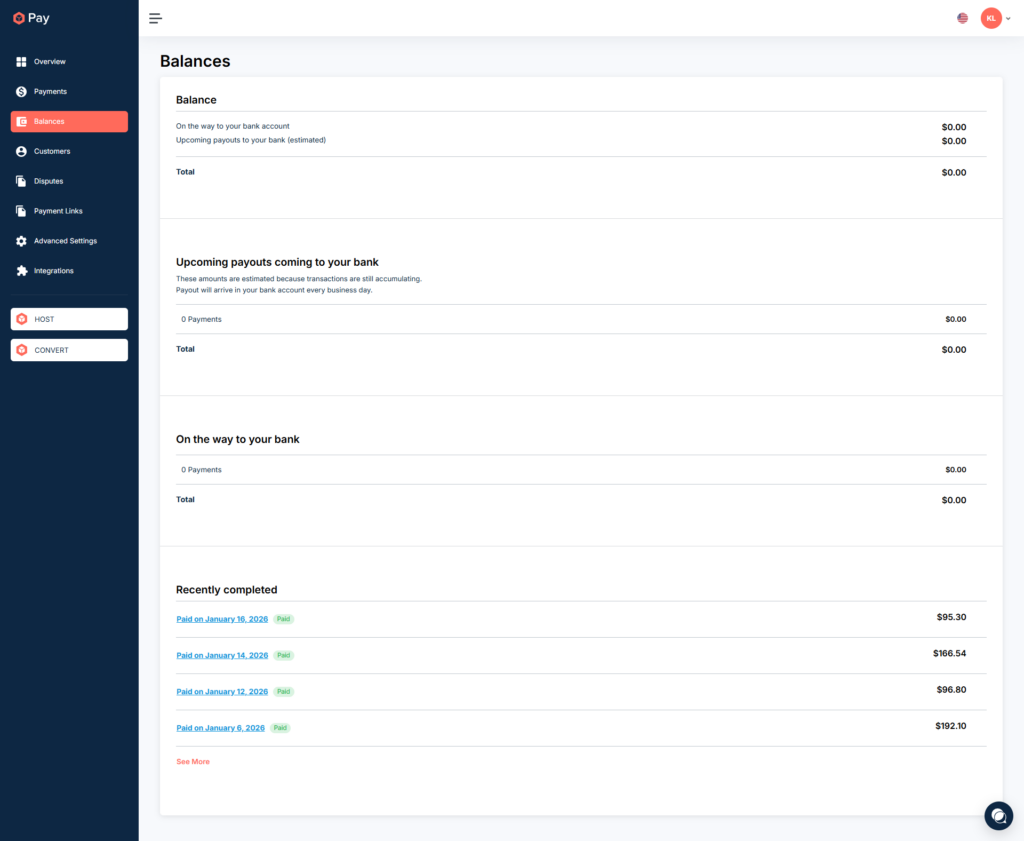
You can review completed payouts and transaction-level details directly in the Convesio app.
View Completed Payouts
After a payout occurs, this section reflects the transactions that have already arrived in your bank account.
- Go to Balances in your Convesio dashboard
- Scroll to the bottom of the page
- Open Recently Completed Payouts (at the bottom of the page)
View Transaction Breakdown
Within each payout, you can:
- Review the financial breakdown for each transaction, including:
- Gross sale amount
- Processing fees
- Net amount paid out
- Reserve amount (if applicable)
- Download a CSV file with these details

Monthly Statements
After the end of each month, ConvesioPay provides statements that summarize:
- Total sales
- Fees
- Reserves
- Payouts
These statements are useful for reconciliation and accounting purposes.
Key Things to Keep in Mind
- Payouts are not instant and do not reflect same‑day sales
- Settlement timing is business‑day based
- Bank processing times can vary
- Reserve amounts can affect payout totals
- Processing fees are deducted at the time of each transaction, so settled balances already reflect net amounts.
Still Have Questions?
If you are reviewing your payouts and something still does not look right:
- Download the payout details to confirm which transactions were included
- Review payout CSVs for reserve deductions
- Contact Convesio Support with the payout ID you are reviewing
Our support team can help clarify any specific payout or transaction questions.