Introduction
This guide explains how to configure a Cloudflare Firewall / WAF Custom Rule to bypass security protections for ConvesioPay webhook and API endpoints.
This is required to prevent legitimate payment status callbacks from being blocked by Cloudflare’s WAF, Bot Fight Mode, or rate limiting.
When to Use This Rule
Use this rule if:
- Payment status callbacks or webhooks are failing
- Cloudflare is blocking
/wp-json/wc-convesiopay/*endpoints - You see 403, 429, or bot-related blocks in Cloudflare Security Events
- ConvesioPay or WooCommerce payments intermittently fail
Rule Overview
- Purpose: Allow ConvesioPay REST API and webhook traffic
- Action: Skip Cloudflare security checks
- Scope: URI paths related to
wc-convesiopay
Step-by-Step Configuration
1. Navigate to Cloudflare Firewall Rules
- Log in to Cloudflare
- Select the correct domain
- Go to:
Security → WAF → Custom rules- Click Create rule
2. Rule Name
Rule name (required):
ConvesioPay Whitelist Rule
Tip: Use a descriptive name so it’s easy to identify later.
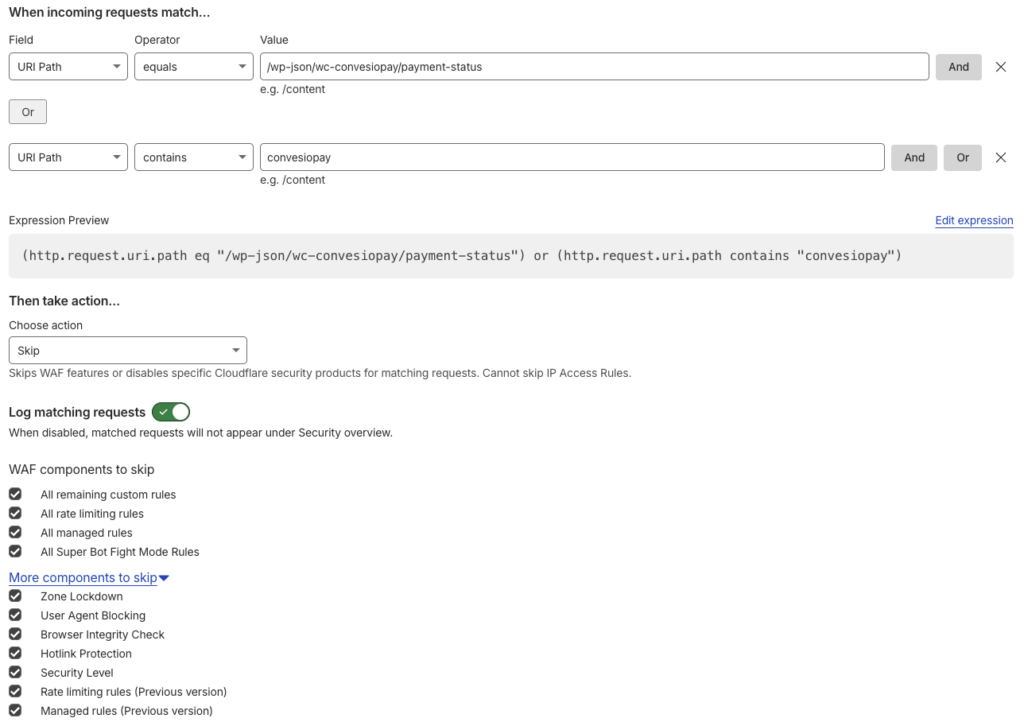
3. Configure Matching Conditions
Under “When incoming requests match…”, add the following conditions.
Condition 1 (Exact Webhook Endpoint)
- Field: URI Path
- Operator: equals
- Value:
/wp-json/wc-convesiopay/payment-status
Click OR (not AND).
Condition 2 (All ConvesioPay Endpoints)
- Field: URI Path
- Operator: contains
- Value:
convesiopay
4. Expression Preview (Reference)
Your expression preview should look like this:
(http.request.uri.path eq "/wp-json/wc-convesiopay/payment-status")
or
(http.request.uri.path contains "convesiopay")
This ensures:
- The specific payment status webhook is allowed
- Any future ConvesioPay endpoints are automatically covered
5. Configure the Action
Under “Then take action…”
- Choose action:
Skip
This tells Cloudflare to skip security enforcement for matching requests.
6. Logging Configuration
- Log matching requests: ✅ Enabled
This allows visibility in Security → Events for troubleshooting without blocking traffic.
7. WAF Components to Skip
Enable the following options exactly as listed:
Core WAF Components
- ✅ All remaining custom rules
- ✅ All rate limiting rules
- ✅ All managed rules
- ✅ All Super Bot Fight Mode Rules
Additional Components (Expand “More components to skip”)
- ✅ Zone Lockdown
- ✅ User Agent Blocking
- ✅ Browser Integrity Check
- ✅ Hotlink Protection
- ✅ Security Level
- ✅ Rate limiting rules (Previous version)
- ✅ Managed rules (Previous version)
⚠️ Do not skip IP Access Rules — Cloudflare does not allow this, and it should remain enforced.
8. Save the Rule
Click Deploy or Save rule.
The rule becomes active immediately.
Security Notes & Best Practices
- This rule only bypasses security for specific API paths, not the entire site
- ConvesioPay endpoints are authenticated and validated at the application level
- Logging remains enabled for auditing and debugging
- This is a recommended configuration for stable payment processing
ConvesioPay runs on Adyen’s payment infrastructure — see how it processes WooCommerce transactions → https://convesio.com/pay
Troubleshooting
If issues persist:
- Check Cloudflare → Security → Events
- Confirm requests match the rule
- Verify the endpoint path exactly matches your WooCommerce installation
- Ensure no conflicting IP Access Rules exist
Still seeing blocked webhooks after this? Talk to support →
Summary
This firewall bypass rule ensures:
- Reliable payment status callbacks
- No false positives from WAF or bot protection
- Stable WooCommerce + ConvesioPay processing
- Full visibility without security noise
If you’re weighing ConvesioPay against other processors while you’re in here, see how it compares to Stripe and Authorize.net.