This article explains how Sandbox (test) and Production (live) environments work in ConvesioPay, how to switch between them, and where to find test data, API keys, and test cards.
Overview: Sandbox vs Production
ConvesioPay provides two separate environments:
- Production (Live Mode) – Used for real customer payments and real payouts
- Sandbox (Test Mode) – Used for testing integrations, checkout flows, and payment scenarios without processing real money
Each environment requires a separate connection. Switching between Sandbox and Production always requires reconnecting your ConvesioPay account.
Connecting to Production (Live Mode)
To connect your store to Production:
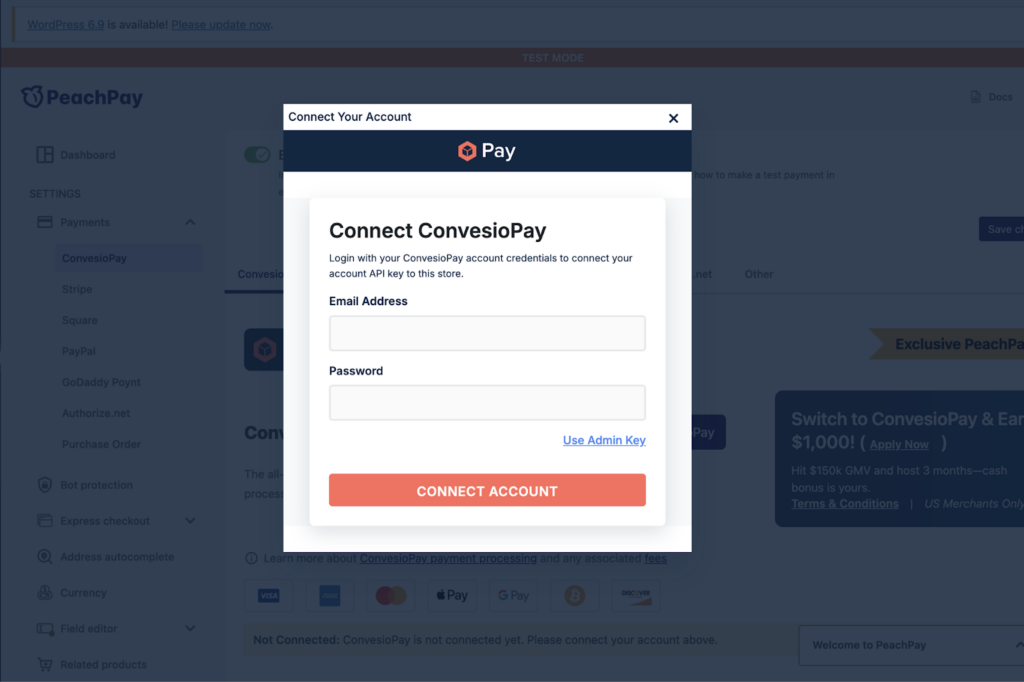
- Open your ConvesioPay connection settings
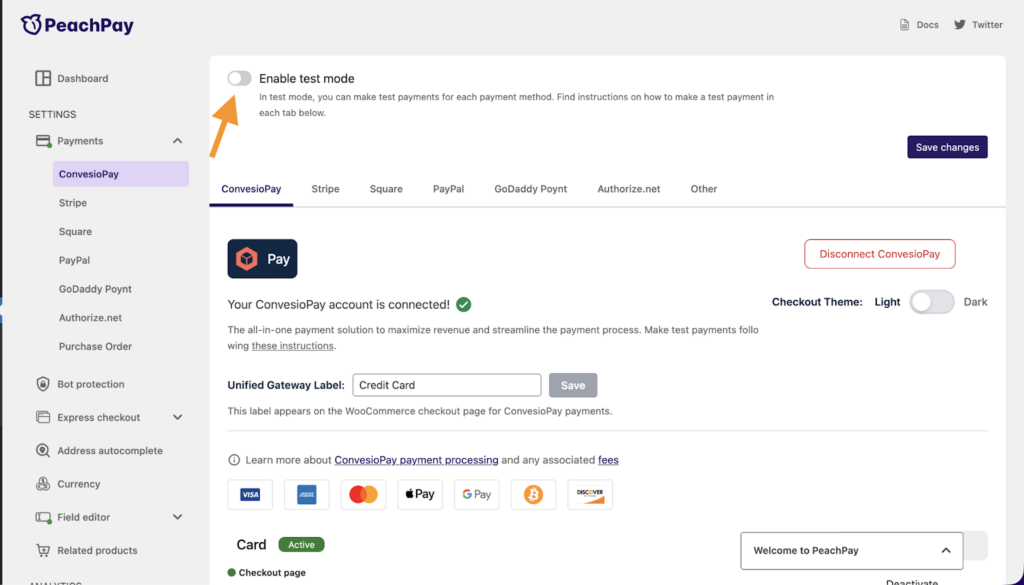
- Ensure Test Mode is disabled (OFF)
- Connect or reconnect your ConvesioPay account
Once Test Mode is OFF and the account is reconnected, all payments will be processed as live transactions.
Important: If Test Mode was previously enabled, you must reconnect your account after disabling it for the change to take effect.
Connecting to Sandbox (Test Mode)
To use the Sandbox environment:
- Open your ConvesioPay connection settings
- Enable Test Mode (ON)
- Connect or reconnect your ConvesioPay account
When Test Mode is enabled, your store will use the Sandbox environment and no real charges will be made.
Switching between Sandbox and Production always requires a reconnect.
Accessing the Sandbox Dashboard
You can access the Sandbox environment directly at:
- Sandbox Login: https://dev.convesiopay.com/auth/sign-in
This dashboard is completely separate from Production and contains only test data.
Using Test Cards in Sandbox
In Sandbox mode, you can simulate different payment scenarios using test cards.
- Test card documentation: https://docs.convesiopay.com/convesiopay-payment-checkout-integration-api/payments/test-cards
These cards allow you to test:
- Successful payments
- Failed payments
- Other payment edge cases
No real funds are charged when using test cards.
Finding Your Sandbox API Key
If your integration requires an API key:
- Log in to the Sandbox dashboard
- Go to Advanced Settings
- Locate your Sandbox API Key
Sandbox API keys are different from Production API keys and cannot be used interchangeably.
- Sandbox API Key page: https://dev.convesiopay.com/advanced-settings/api-key
Viewing Sandbox Payments Data
All Sandbox payment activity can be viewed here:
- Sandbox Payments: https://dev.convesiopay.com/payments
This page shows only test transactions and does not include any Production data.
Common Questions
Do I need to reconnect every time I switch environments?
Yes. Any time you switch Test Mode ON or OFF, you must reconnect your ConvesioPay account for the change to apply.
Will Sandbox payments appear in my Production dashboard?
No. Sandbox and Production data are completely separate.
Can Sandbox payments trigger real payouts?
No. Sandbox transactions are for testing only and never result in real charges or payouts.
Need Help?
If you are unsure which environment you are connected to or are seeing unexpected behavior:
- Verify whether Test Mode is ON or OFF
- Confirm you reconnected your account after switching modes
- Contact Convesio Support with details of what you are trying to test or launch
Our support team can help ensure you are connected to the correct environment.