What is Payment Orchestration?
Payment orchestration is a routing layer that sits between your business and multiple payment processors. Instead of being locked to a single gateway, ConvesioPay’s Orchestration Layer (OL) intelligently routes each transaction to the best available processor — based on cost, approval rate, and availability.
If one processor goes down or declines a transaction, the OL can automatically reroute to a backup. For merchants in regulated or high-risk industries, this resilience is critical.
Why it matters for your business
- Redundancy: No single processor failure can take down your checkout
- Higher approval rates: Route transactions to the processor most likely to approve them
- Lower costs: Optimize routing by transaction cost across your connected processors
- Access to more payment methods: Features like Google Pay are unlocked at the account level when the Orchestration Layer is active
- Seamless failover: Customers rarely see a failed payment — the OL retries behind the scenes
How ConvesioPay’s Orchestration Layer works
When a customer places an order, the Orchestration Layer:
- Receives the payment request from your checkout (WooCommerce, Shopify Plus, HighLevel, etc.)
- Evaluates connected processors based on your routing rules
- Routes the transaction to the optimal processor
- If the processor fails or declines, reroutes to the next available option
- Returns the result to your checkout in real time
You configure routing preferences and connected processors via Advanced Settings → Connected Integrations in your ConvesioPay dashboard.
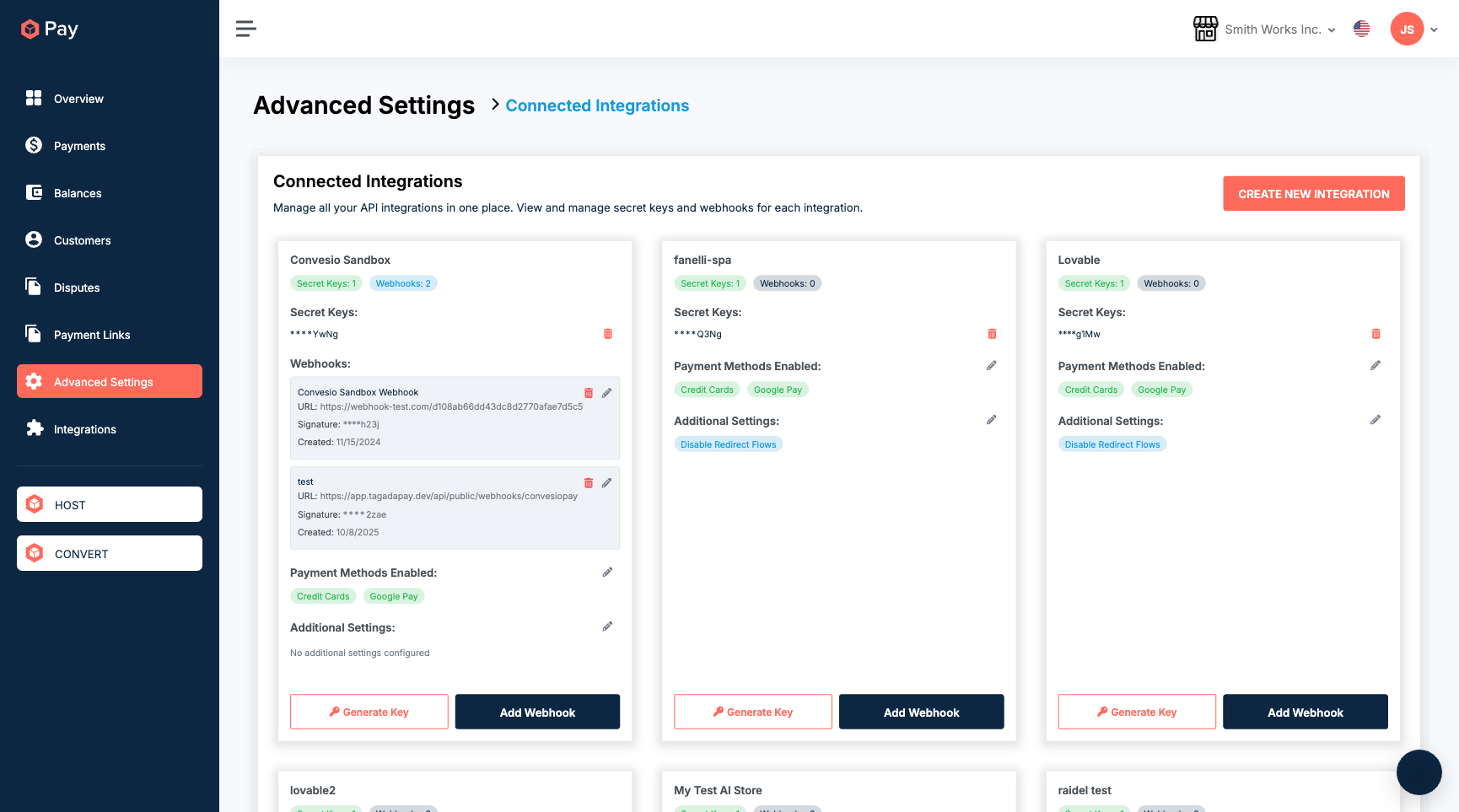
Payment methods enabled by the Orchestration Layer
Some payment methods — including Google Pay — are only available on accounts with the Orchestration Layer active. Once enabled at the account level, you can toggle these methods per integration:
- Go to Advanced Settings → Connected Integrations
- Find your integration and click the pencil icon next to Payment Methods Enabled
- Toggle Google Pay, Credit Cards, or other available methods on or off
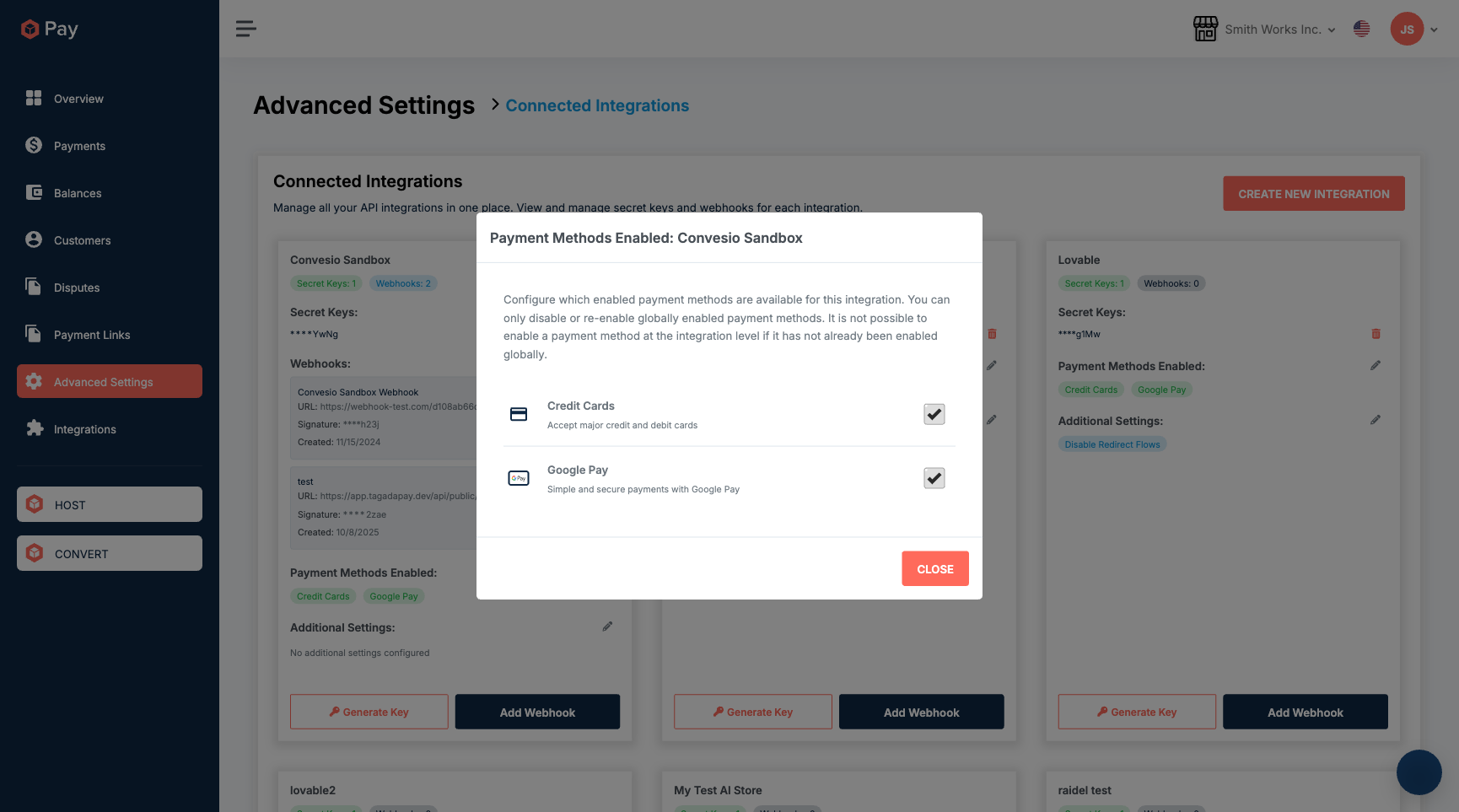
This per-integration control means you can accept Google Pay on your WooCommerce store without enabling it on a separate internal integration, for example.
Supported integrations
The Orchestration Layer works across ConvesioPay’s native integrations:
- WooCommerce (via PeachPay)
- Shopify Plus
- GoHighLevel
- WHMCS
- WS Form
- Swell
- SwissCRM
- And more — see convesio.com/pay/integrations
ConvesioPay vs. traditional single-processor setups
| Single processor (e.g. Stripe) | ConvesioPay Orchestration Layer | |
| Processor redundancy | ✗ | ✓ |
| Automatic failover | ✗ | ✓ |
| Google Pay / Apple Pay | Limited | ✓ (OL required for Google Pay) |
| High-risk industry support | Often restricted | ✓ |
| Routing optimization | ✗ | ✓ |
How to get started
The Orchestration Layer is enabled by Convesio’s team during account setup. If you’re not sure whether it’s active on your account, check Advanced Settings → Connected Integrations — if you see integrations with Payment Methods Enabled showing Google Pay, it’s active.
To request activation or ask about your current setup, contact support.